| Scrape… scrape…. scrape…. You know the sound; that of wiper blades on a dry screen when there is insufficient water to lubricate the blade yet just enough to reduce visibility. Modern cars have intermittent wiper control but our older MGs have either fixed one or two speed wipers. MG Owners can now upgrade to fully variable intermittent wiper delay of between 3 and 30 seconds, for less than thirty pounds from our Club Accessories department, using the existing wiper switch or stalk control. The following shows how Smartscreen is easily and unobtrusively fitted within an MG Midget and a rubber bumpered MGB.
MGB Installation
Ensure the car’s battery is disconnected. The unit may be fitted either in the engine bay or behind the dash as shown. Using the spade connectors supplied. Run and connect a new cable from the -ve terminal to a convenient earth point ,eg under a screw head. Run and connect a new terminal from the +ve terminal to a spare way in the fuse box which is live when the vehicles’ ignition is on. Identify the two cables running from the wiper stalk to the wiper motor which will need to be taken to the remaing three blades on the unit.. The first cable is red with a light green trace, this needs to be cut close to the unit and a connector attached to each of the resulting ends. The end which is still connected to the wiper stalk needs to be connected to the SW terminal and the end still connected to the wiper motor needs to be connected to the W terminal. The second cable is brown with a light green trace, this needs to be connected to the P terminal by means of a new length of cable and the scotchloc connector supplied. After double checking all connections reconnect the battery. Smartscreen is now ready for testing before being permanently fixed behind the dash.
MIDGET Installation
Ensure the car’s battery is disconnected. The unit may be fitted either in the engine bay or behind the dash as shown. Using the spade connectors supplied. Run and connect a new cable from the -ve terminal to a convenient earth point, eg under a screw head. Run and connect a new cable from the +ve terminal to a spare way in the fuse box which is live when the ignition is on. Identify the cable running from the wiper switch to the wiper motor which will need to be taken to the remaining two blades on the unit. The cable is black with green trace, this needs to be cut close to the unit and a connector attatched to each of the resulting ends. The end which is still connected to the wiper switch needs to be connected to the SW terminal and the end which is still connected to the wiper motor needs to be connected to the W terminal. After double checking all connections reconnect the battery. Smartscreen is now ready for testing before being permanently fixed behind the dash.
TESTING
Wet the screen and then switch the wipers on for about 10 seconds before turning off. The wipers should function normally with the LED flashing for about 3 seconds and then going out. If the wipers do not move, check the wiring. The LED helps you understand the operation of the unit and will not need to be visible once testing is completed. Continue the test by setting an intermittent period.
1. Flick the stalk/switch briefly on then off, the wiper will wipe once . LED will flicker.
2. After the desired delay, which must be longer than three seconds but less than thirty, flick the stalk/switch briefly again – the wiper will wipe once and continue to wipe at the set delay, LED will light continously.
NB The unit will ignore any inputs whilst wiper is moving.
3. To set a new delay flick stalk/switch briefly again – the wiper will wiper once, LED will flicker. After the new delay flick the stalk/switch again and the wiper will wipe once and continue to wipe at the new delay, LED will light continuously.
4 To cancel the wiper flick the switch /stalk briefly: the wiper will wipe once, do not flick the switch again within thirty seconds. (The unit will give up looking for a second command after thirty seconds). Alternatively switch the wipers on continuously for five seconds or more and then off again. Once reset the LED is off.
|
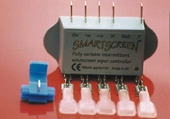
Smartscreen and fittings MGB
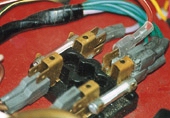
Fuse box Midget
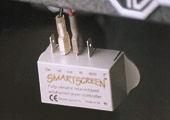
Positive and negative connection
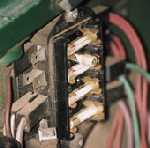
Fuse box MGB 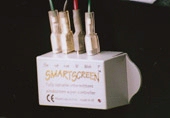
All connections Midget 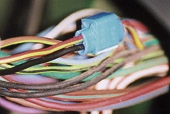
Tapping into park line MGB 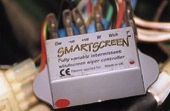
All connections made |